


The admin configures it.The AI extracts it.QC signs it off.
Source Hub runs data extraction projects for its clients - invoices, insurance papers, legal documents. More than 200 people were doing that work on OCR software that could read a page but could not pull the fields out of it. Now AI does the OCR and the extraction together, fills the form the admin configured for that project, and a QC user validates it before the data goes to the end client.
The problem
Source Hub takes on data extraction projects for its clients. Invoices. Insurance papers. Legal documents. Whatever arrives, the job is the same: read it, pull out the fields that client asked for, and hand back clean data they can use.
They already had OCR software. The trouble is that OCR reads a page, it does not understand it. It gives you the text. It does not give you the invoice number, the party name, the policy number and the amount sitting in the right columns. So more than two hundred people were doing that part themselves, document by document, all day. The software helped a little. It did not scale, and the floor could not grow faster than they could hire.
And every project is different. One client wants fields off an invoice. The next wants them off an insurance pack, a legal paper, or a screenshot of an email. On most systems each of those is new extraction logic somebody has to write, so a new project waits on a development team that has its own queue.
OCR reads a page. It does not understand it.
What we built
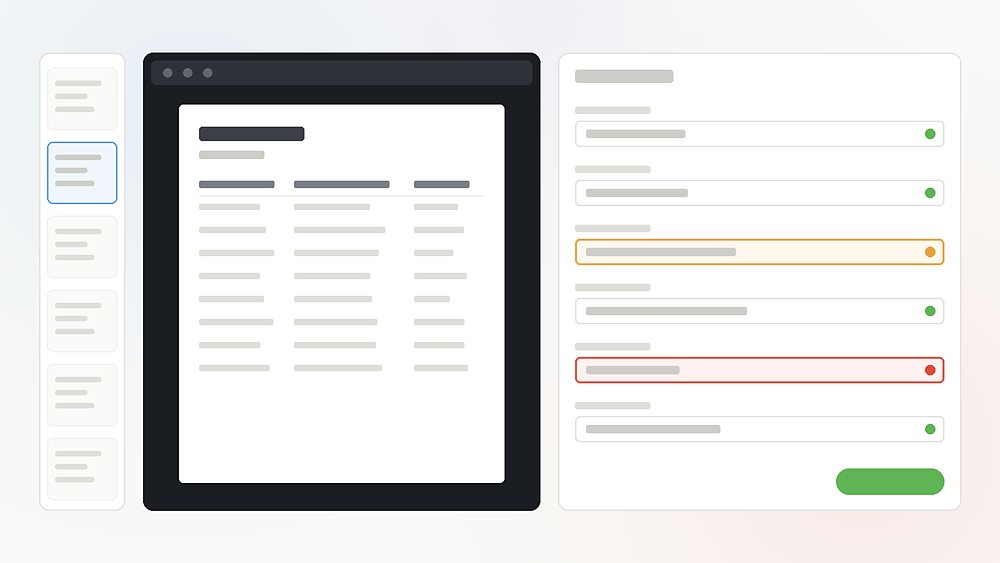
Shine is a browser application that runs the whole floor. The AI does the OCR and the extraction in one pass, fills in the form the admin configured for that project, and hands it to a QC user. The operator checks the values against the document on the same screen, corrects anything wrong, and approves. Approved data is what goes out to the end client.
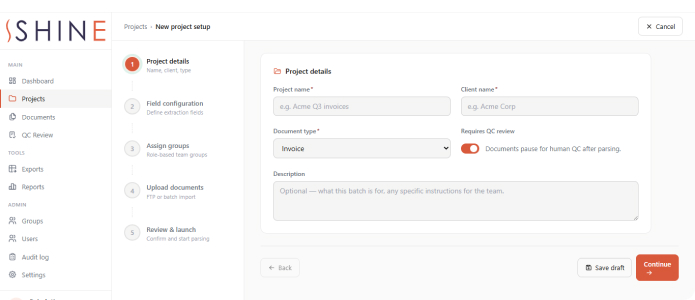
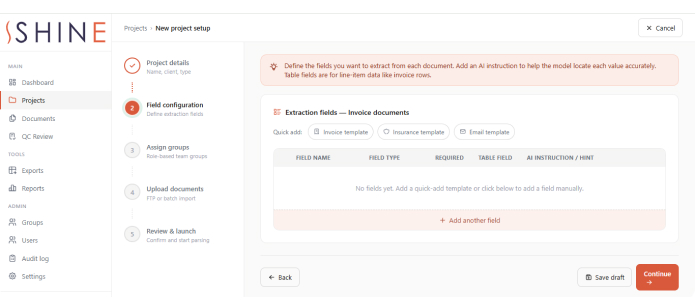
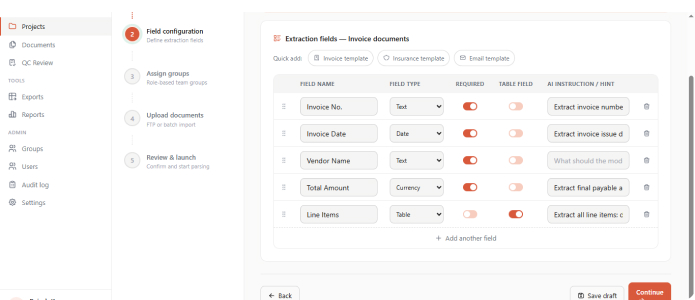
What makes it work for a BPO is that a project is configured, not built. The admin sets up the form first - the exact fields this client wants, each with its type and its own instruction for the AI. Then they open the AI Data Extraction Studio and write the master prompt for the project: where the values sit on the page, what format the dates should be in, what to do when something is missing from the image. They mark up two to five sample documents with Acrobat comments so the model can see what they mean. Mistral generates the master prompt from all of that. The admin edits it, saves it as a version, and can restore any earlier version. Then they test it on a real document and read back exactly what came out - without creating a single QC task or touching the live queue.
Nothing runs live until that prompt is approved. Until it is, OCR, extraction and QC for the project stay locked. If the instructions or the prompt are edited later, the project drops back to draft and locks again until it has been re-tested and re-approved. A client’s work never runs on a prompt nobody checked.
That is why a new kind of document is not a new development project. If a client asks tomorrow for data out of email screenshots, the admin configures the form for the fields they want, writes the instructions in the studio, tests it, approves it - and the floor starts working the same day. No developer. No release.
Inside the platform
Setting up a project, without a developer
- The form configured per project - the exact fields the client wants, each with a type and its own AI instruction
- Named form templates per document type, reused on the next project of that kind
- Master prompt written in plain English in the AI Data Extraction Studio
- Two to five sample documents marked up with Acrobat comments, so the model sees what you mean
- Prompt generated by Mistral, then edited and saved as a version - any earlier version restorable
- Tested on a real document first. Approval is what unlocks live work, and editing the brief locks it again
Running a floor of two hundred
- Five roles - super admin, admin, project manager, QC user, auditor - enforced on the server, not just hidden in the screen
- QC teams built as groups and assigned to projects; work handed out round-robin to the users on that project
- Files arrive by FTP with an Excel control sheet; what actually arrived is checked against what was expected
- Every document tracked through incoming, processing, parsed, QC pending, QC done and exported
- Three-pane QC desk - task list, the document, the extracted form - with approve and reject always in view
- Failed OCR sent to QC with a note instead of stalling; audit log of who did what, exportable to CSV
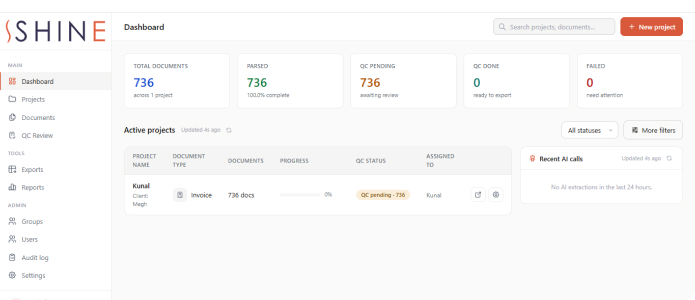
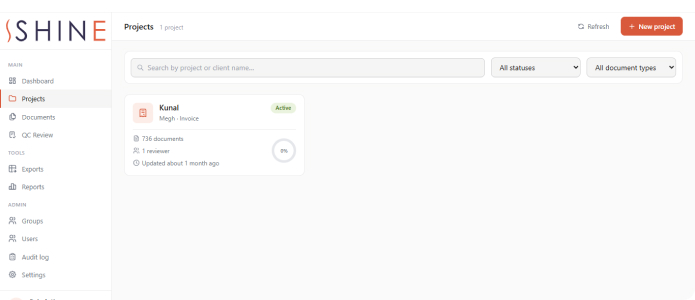
What it looks like

What changed
The extraction is done before a person opens the file
The AI does the OCR and the extraction together and fills the form. The operator’s job changes from hunting for every field and typing it, to checking values that are already on the screen next to the document.
A new document type is a setting, not a project
Email screenshots, a new insurance format, a legal paper nobody has seen before - the admin configures the form, writes the instructions, tests and approves. The work that used to need a developer and a release is now an afternoon in the application.
Nothing untested can touch a client’s work
The live pipeline stays locked until the extraction prompt is approved, and it locks again the moment somebody edits it. That gate is what makes configuration by non-developers safe rather than risky.
Two hundred people, and you can still see who did what
Five server-enforced roles, QC teams assigned as groups, work handed out automatically, and an audit log behind all of it. At this headcount that is not paperwork - it is how you answer a client asking who approved a particular document.
How it was built
React in the browser, an Express API behind it, and background queues carrying the OCR, extraction, QC assignment and export. Azure Blob storage is required in production - point it at local storage and it refuses to start.
Other systems we have built near this one
How many people are reading your documents today?
Invoices, insurance papers, legal documents, delivery challans, screenshots of an email - anywhere a team opens a file and types what it says into another system. Tell us what your documents look like and how many people are on them, and we will tell you straight which part AI can read, and which part still needs a person to sign off.